Sample Task
Whenever you open IDLE, you can see the IDLE Shell. On a new line of the IDLE shell are the characters “»>” as seen below:
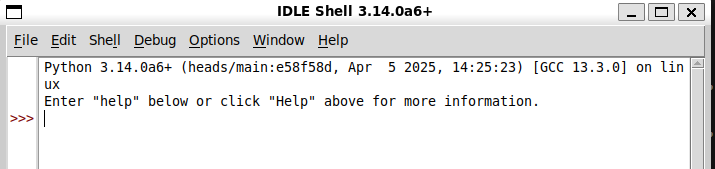
Task: Locate where in the code these characters are set and change them to be “:)”. Make sure to document your process and provide satisfactory evidence that your solution works as expected.
Sample Design Doc
Overview
This change modifies the prompt text shown in the IDLE shell sidebar. In the original IDLE shell, new input lines display the prompt characters >>>. For Task 1, the goal is to change this visible prompt from >>> to :). The assignment asks us to locate where these characters are set, make the change, and verify that the shell displays the updated prompt correctly.
Relevant Code Structure
The visible prompt text is rendered in sidebar.py. The sidebar uses a Tkinter canvas to draw prompt text next to shell lines. During sidebar updates, the code determines whether each line should show the shell prompt, then passes that prompt string into canvas.create_text(...).
The relevant flow is:
ShellSideBar.update_sidebar()
→ checks line/tag information
→ chooses prompt text
→ draws prompt using canvas.create_text(…)
→ prompt appears in the IDLE shell sidebar
Diagrams
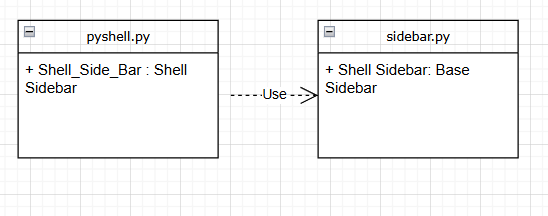
This is a UML class diagram (tip: we recommend using draw.io for manual uml diagrams, although there are tools out there to generate automated uml diagrams for comprehension purposes )
Design Decision 1: Where to Change the Prompt Text
The main design decision was where to make the prompt change. I first considered whether the prompt might be controlled by shell-level logic in pyshell.py, since the >>> prompt appears in the interactive shell. However, testing showed that the initially inspected code path did not affect the visible sidebar prompt. The relevant code was instead in sidebar.py, where the prompt text is drawn in the UI.
The chosen approach was to directly change the prompt string in sidebar.py, where the sidebar decides what text to display. This keeps the change localized to the UI component responsible for rendering the prompt.
Alternatives Considered
Alternative 1: Change shell-level behavior in pyshell.py.
This seemed plausible at first because pyshell.py is related to the interactive shell. However, this was not the right location for this task because the visible sidebar prompt was not controlled by the code path I initially inspected. Changing shell-level logic could also risk affecting behavior beyond the sidebar display.
Alternative 2: Change the prompt directly in sidebar.py.
This was the better approach because the assignment only asks for a visual prompt change in the IDLE shell sidebar. The change is small, localized, and easier for future developers to understand.
(Note: In assignments with more design heavy considerations, alternatives should include working solutions.)
Final Approach
I changed the prompt string in sidebar.py from >>> to :). After making the change, I ran IDLE and verified that the sidebar displayed :) instead of >>>. I also updated the related sidebar tests so that future test runs would expect the new prompt text.
Sample Process Journal
-
I need to make a UI change to the shell. So I’ll probably need to avoid any of the editor files, and find ones related to the shell. It seems like I’ll need to find the UI widget that controls the panel on the side. [comprehension process]
-
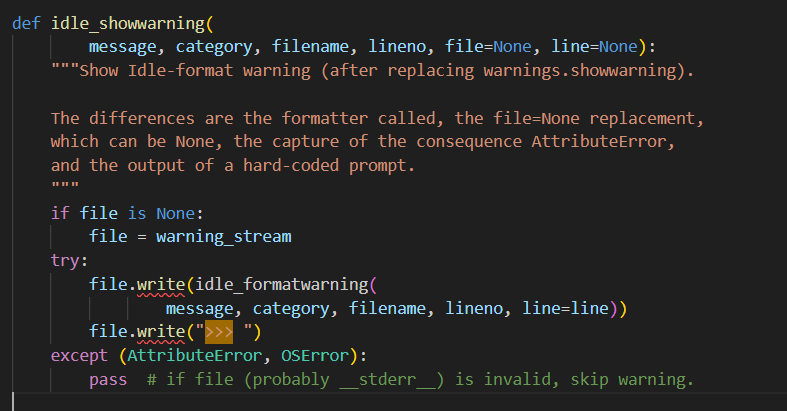
To find where the characters “>>>” appear, I global searched for “>>>” in the idlelib dir and found pyshell.py, which seems like it might be relevant for making changes to the interactive shell. The symbols were used in the function idle_showwarning() which writes out warnings to a file based on whatever file you pass into it. [comprehension process]
-
I decided to add a print statement idle_showwarning() to print out the value of the file right before the try-except block. However, when I ran idlelib with
./../python.exe -m idleliband made multiple newlines, I didn’t hit this code at all and nothing printed out. I believe for this reason that I am in the wrong place. [obstacles encountered, running and testing] -
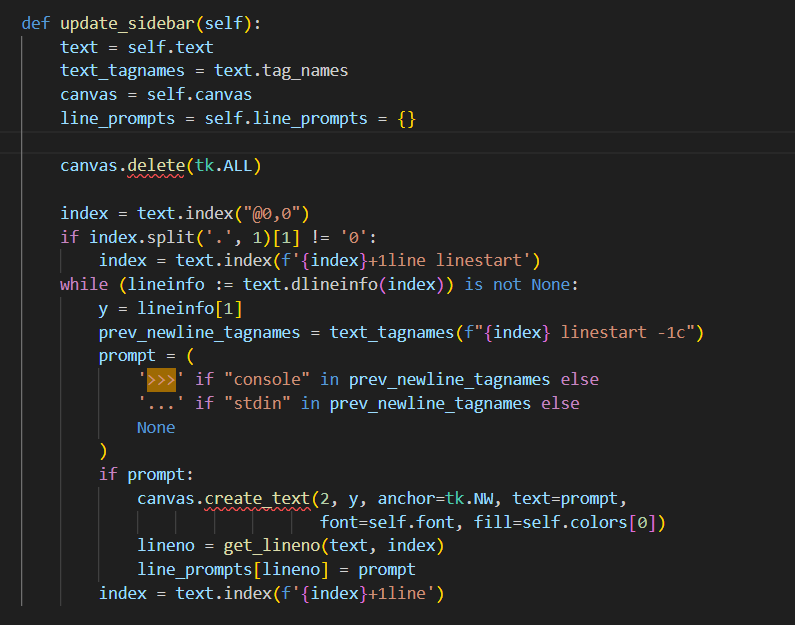
I talked to a friend, John Code, and they reminded me that the front end UI of Idlelib is based on the Tkinter graphics library; this means that during my search I should emphasize files that import Tkinter and use some type of Tkinter command with “>>>”. Another file that I found was sidebar.py which has this function update_sidebar(). [resources consulted]
-
After consulting ChatGPT to learn how this function works with Tkinter, I learned that the variable “prompt” from my initial understanding seems to add the characters “>>>” if the console is outputting something, and “…” if the user needs to input something. [resources consulted]
-
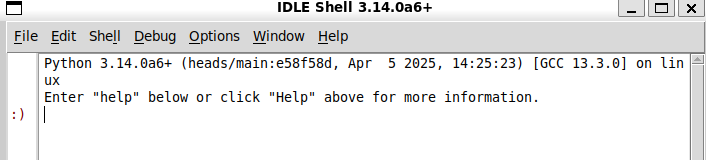
I changed the prompt to be “:)” and reran idlelib, expecting the sidebar text to switch from ‘>>>’ to ‘:)’. Great, it seems to work! No errors were logged [running and testing]
-
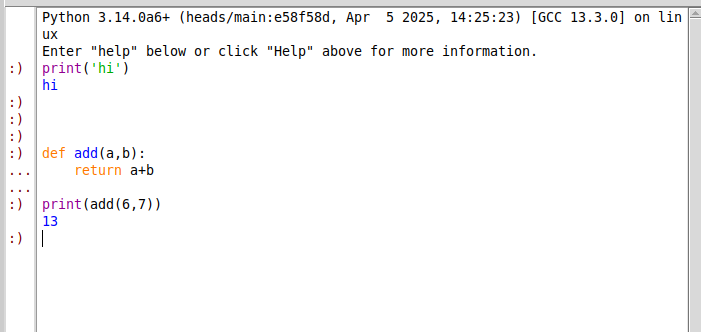
I then tested some more edge cases to make sure the feature behaves as expected with multiline inputs. [running and testing]
-
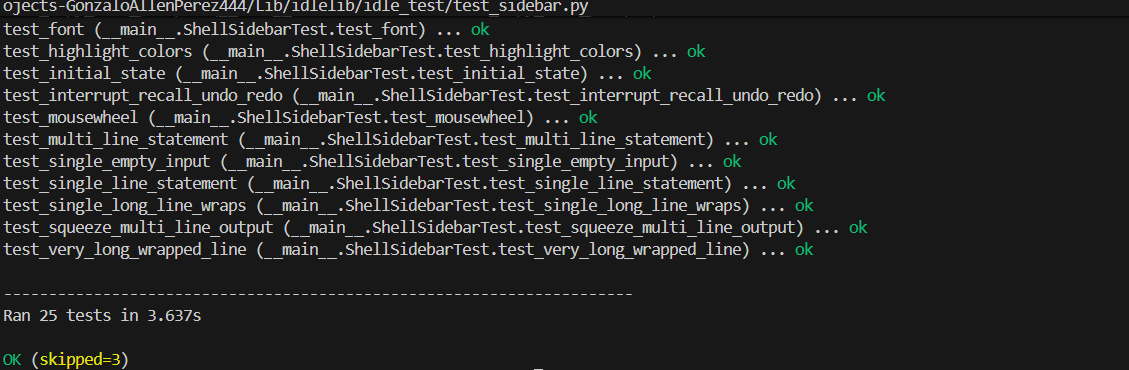
The course staff also recommended that I should change the IdleLib tests in test_sidebar to reflect the new characters in the sidebar, so that future developers wouldn’t get random failing tests whenever they ran the test suite. To do this I could simply replace all instances of “>>>” with “:)” in the tests, and after running the tests they all passed: